

Stop and restart a runtime
Use Stop when you need to halt a running PLC program but plan to resume the same project later — for example during a planned maintenance window or when investigating a fieldbus issue. Start, Stop, and Restart are available from the device Actions section.
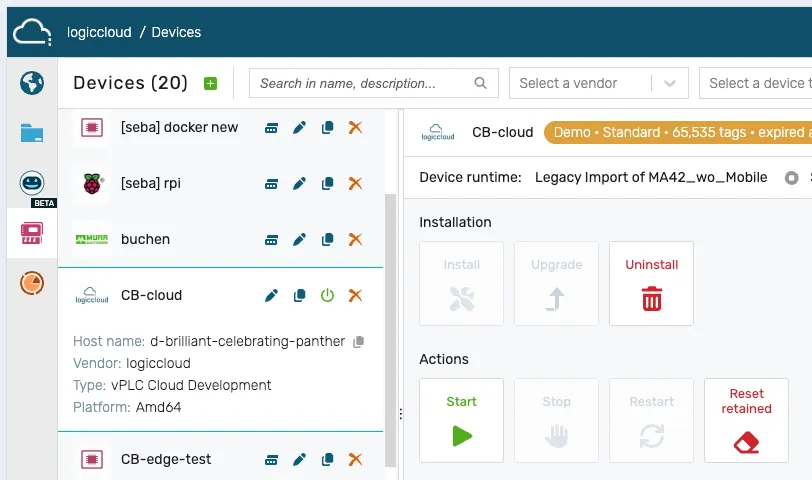
Stop a runtime
Section titled “Stop a runtime”- Open the Portal and navigate to Devices.
- Select the device.
- In the Actions section, choose Stop and confirm.
The runtime status changes to Stopped.
Restart after stop
Section titled “Restart after stop”- In the Actions section, choose Start (or Restart).
- Wait for the status to become Running.
The same project version starts up again without a re-download or reinstall — the installed build is preserved across stop/start and restart.
License-triggered stops
Section titled “License-triggered stops”If the license on an edge device expires, the runtime is stopped automatically to avoid running unlicensed software.
- A license-stopped device shows a Stopped runtime status, and the license pill on the device card reflects the expiry (for a demo license,
Demo · <product> · expired at <timestamp>). - The Activity log records the stop together with its reason — for example “License service reports license expired (‘<process>’); runtime will stop.” followed by “Runtime stopped: license expired (process ‘<process>’)” — so the action can be audited.
To recover, renew or activate the license, then Start the runtime again. For license states and activation, see the Licensing section.